Product Support

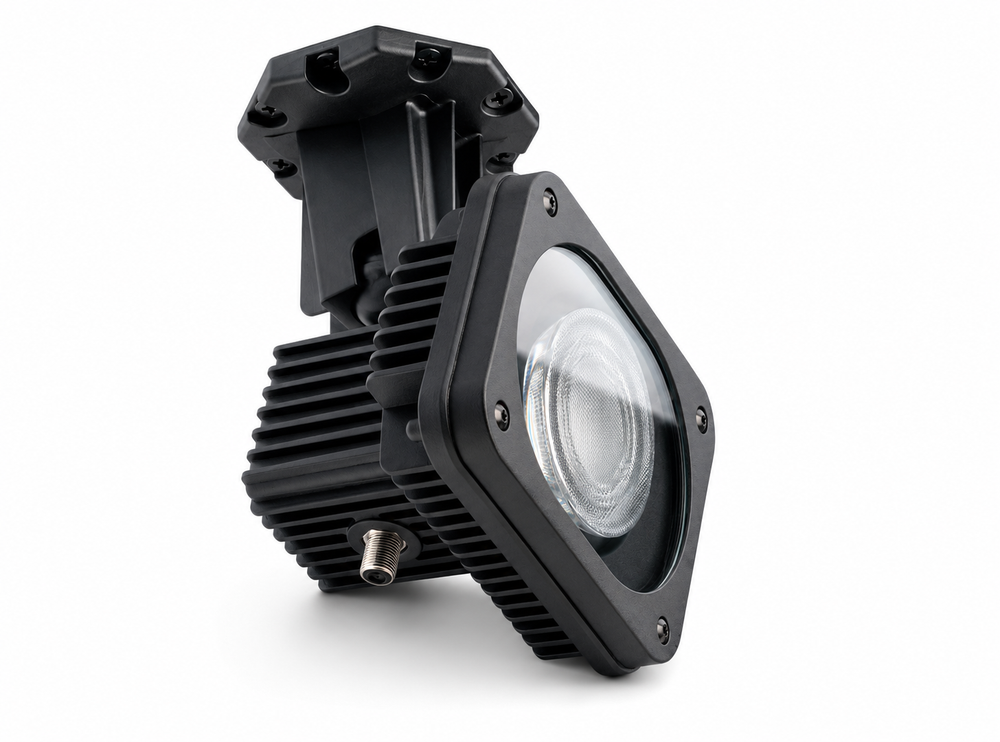
Pro-Floodlight

Model: CM-9000

Browse product documentation, instructional videos, downloads, and answers to common questions.
View Product
Pro-Floodlight

Videos

Questions & Answers

How is the Pro-Floodlight powered?

The Pro-Floodlight is powered by 24V DC delivered over RG-6 coaxial cable from the included PRO-FLOODLIGHT ADAPTER.

Does the Pro-Floodlight use the coax cable for Wi-Fi or data?

No. The coax cable is used only to deliver power to the light. The Pro-Floodlight connects to your network separately using 2.4 GHz Wi-Fi.

What is the Channel Master Pro-Floodlight?

The Channel Master Pro-Floodlight is a smart outdoor floodlight designed for Apple Home. It uses standard RG-6 coaxial cable to deliver 24V DC power from the PRO-FLOODLIGHT ADAPTER, allowing the light to be installed where traditional electrical wiring or a nearby power outlet may not be available.

How much coax cable is included?

The Pro-Floodlight includes 25 feet of white RG-6 coaxial cable.

How far can I install the Pro-Floodlight from the PRO-FLOODLIGHT ADAPTER?

The Pro-Floodlight supports up to 150 feet of RG-6 coaxial cable while maintaining full operating brightness under normal conditions.

Can I use my existing coax cable with the Pro-Floodlight?

Yes, provided it is suitable RG-6 coaxial cable and is not connected to another powered or RF distribution system. Channel Master recommends good-quality RG-6 tri-shield cable for best performance.

Can I use a coax splitter to power more than one Pro-Floodlight?

No. Each Pro-Floodlight requires its own PRO-FLOODLIGHT ADAPTER and a direct coax connection. Splitters should not be used.

Can one PRO-FLOODLIGHT ADAPTER operate multiple Pro-Floodlights?

No. The system is designed for one PRO-FLOODLIGHT ADAPTER per light.

Does the Pro-Floodlight work with Android, Google Home or Amazon Alexa?

No. The Pro-Floodlight is designed specifically for Apple Home and does not support Android, Google Home or Amazon Alexa.

Does the Pro-Floodlight work with Apple Home?

Yes. The Pro-Floodlight is designed for Apple Home.

Do I need an Apple Home hub?

A Home hub is required for remote access, schedules and automations when you are away from home. Local control can be used without remote access.

What Wi-Fi network does the Pro-Floodlight require?

The Pro-Floodlight connects to a 2.4 GHz Wi-Fi network.

Does the coax cable extend the Wi-Fi range to the Pro-Floodlight?

No. The coax cable supplies power only. The Pro-Floodlight must still be within range of your 2.4 GHz Wi-Fi network.

What color temperature is the Pro-Floodlight?

The Pro-Floodlight uses a 4000K color temperature, which provides a neutral white light suitable for outdoor areas.

How bright is the Pro-Floodlight?

The Pro-Floodlight is designed to produce up to approximately 2,000 lumens of light output.

What is the beam angle of the Pro-Floodlight?

The floodlight has an approximately 110-degree beam angle for broad area illumination.

How far does the light project?

The Pro-Floodlight is designed for a light throw of approximately 70 feet, although actual usable illumination will vary depending on mounting height, angle and surrounding conditions.

Is the Pro-Floodlight designed for outdoor use?

Yes. The Pro-Floodlight and the PRO-FLOODLIGHT ADAPTER are designed for outdoor use and are rated IP65.

Can the PRO-FLOODLIGHT ADAPTER be installed outdoors?

Yes. The PRO-FLOODLIGHT ADAPTER is designed for outdoor use and is IP65 rated.

Should the PRO-FLOODLIGHT ADAPTER be connected to a GFCI-protected outlet?

Yes. For outdoor installations, Channel Master recommends using a properly installed GFCI-protected electrical outlet.

Can I manually turn the Pro-Floodlight on and off without using Apple Home?

Yes. The PRO-FLOODLIGHT ADAPTER includes a physical button that can be used for manual on/off control.

What mounting hardware is included?

The Pro-Floodlight includes a 1/4-20 ball mount that allows the light to be positioned and aimed as needed.

What do the indicator lights mean on the Pro-Floodlight?

The indicator on the light provides a quick indication of input voltage status. Green indicates normal operation, amber indicates low voltage and red indicates high voltage.

What do the indicator lights on the PRO-FLOODLIGHT ADAPTER mean?

The PRO-FLOODLIGHT ADAPTER uses its indicator light to show startup, pairing, connection and paired status. The indicator changes between amber and green depending on the current operating state.

How do I put the Pro-Floodlight into pairing mode?

Press and hold the button on the PRO-FLOODLIGHT ADAPTER for approximately 10 seconds to enter pairing mode.

How do I reset the Pro-Floodlight?

Press and hold the button on the PRO-FLOODLIGHT ADAPTER for approximately 20 seconds to reset the device.

Why is the light indicator amber?

An amber indicator on the light generally means the input voltage is lower than expected. Check the coax connections, cable length and cable condition.

Why is the light indicator red?

A red indicator means the input voltage is higher than expected. Disconnect the system and verify that the correct PRO-FLOODLIGHT ADAPTER is being used.

Why is my Pro-Floodlight not reaching full brightness?

Reduced brightness can be caused by excessive voltage drop, poor coaxial cable, damaged connectors or cable runs beyond the recommended length. Verify that you are using good-quality RG-6 cable and that all connections are secure.

Can I use RG-59 cable instead of RG-6?

Channel Master recommends RG-6 coaxial cable. RG-59 has higher resistance and may result in greater voltage loss, particularly on longer cable runs.

Can I use the Pro-Floodlight with existing satellite or antenna coax wiring?

Existing coax may be usable if it is a direct, isolated RG-6 cable run and is not connected to splitters, satellite equipment, antenna amplifiers, power inserters or other RF equipment. The cable should be verified before connecting the Pro-Floodlight system.

Can the Pro-Floodlight share coax with TV antenna signals, satellite signals or MoCA?

No. The coax connection used by the Pro-Floodlight should be dedicated to the PRO-FLOODLIGHT ADAPTER and light.

What comes in the Pro-Floodlight package?

The package includes the Pro-Floodlight, PRO-FLOODLIGHT ADAPTER and mounting bracket, 1/4-20 light mount, 25 feet of white RG-6 coaxial cable, eight cable clips and a Quick Start Guide.

Can I extend the included 25-foot coax cable?

Yes. You can use a longer RG-6 cable or extend the run with properly installed F-connectors and an appropriate coax barrel connector, provided the total cable run remains within the supported distance.

What is the maximum supported cable length?

The recommended maximum cable length is 150 feet of RG-6 coaxial cable.

Can I install the Pro-Floodlight anywhere outdoors?

The light can be installed in many outdoor locations as long as it has a secure mounting surface, a suitable coax path, access to the PRO-FLOODLIGHT ADAPTER and reliable 2.4 GHz Wi-Fi coverage.

Can I control multiple Pro-Floodlights in Apple Home?

Yes. Multiple Pro-Floodlights can be added individually to Apple Home and then grouped or included in Apple Home scenes and automations.

Can the Pro-Floodlight be submerged in water?

No. IP65 means the product is designed to resist dust and water jets, but it is not designed for submersion.

Can I schedule the Pro-Floodlight to turn on and off automatically?

Yes. Once added to Apple Home, schedules and automations can be created using Apple Home. A Home hub is required for remote access and automation functionality.

Does the Pro-Floodlight have a built-in motion sensor?

No. The Pro-Floodlight does not include a built-in motion sensor. Motion-based automations can be created in Apple Home using a compatible separate motion sensor.

Does the Pro-Floodlight include a camera?

No. The Pro-Floodlight is an outdoor smart light and does not include a camera.

Does the Pro-Floodlight have a built-in dusk-to-dawn sensor?

No. The Pro-Floodlight does not include a built-in photocell or dusk-to-dawn sensor. Dusk-to-dawn operation can be configured through Apple Home automations, such as turning the light on at sunset and off at sunrise.

Can I use a different 24V power supply with the Pro-Floodlight?

Channel Master recommends using only the supplied or approved PRO-FLOODLIGHT ADAPTER designed for the Pro-Floodlight.

What should I do if the Pro-Floodlight loses its Wi-Fi connection?

Confirm that the 2.4 GHz Wi-Fi network is operating and that the Pro-Floodlight is within reliable Wi-Fi range. If necessary, power-cycle the system and reconnect the device through Apple Home.